

- A research client needed AI-powered search across 10,000+ UN General Assembly PDF documents — traditional keyword search wasn’t cutting it.
- We evaluated three options: keyword search, fine-tuning a custom LLM, and Retrieval-Augmented Generation (RAG). RAG won on cost, accuracy, and ongoing maintenance.
- Our custom RAG system reduced typical research lookups from 30–90 minutes of manual search to under 10 seconds, with cited answers grounded in the source documents.
- The same architecture works for legal archives, internal knowledge bases, technical manuals, financial filings, and customer support repositories.
- Watch the 2-minute demo below — then book a free discovery call to see if a custom RAG system fits your business.
Table of Contents
- The Problem: 10,000+ Documents, Zero Time to Read Them
- The Three Options We Evaluated
- Why We Chose a Custom RAG System
- How We Built the RAG System — In Plain English
- Video Demo: See It in Action
- The Business Results: Time, Cost, and Confidence
- Could a Custom RAG System Work for Your Business?
- Frequently Asked Questions
When a client came to us with a vault of more than 10,000 United Nations General Assembly resolutions — public documents like A/RES/76/300 — the request was simple to describe and hard to deliver: “I want my team to ask a question and get a cited answer in seconds, instead of spending an afternoon hunting through PDFs.”
This is the story of how we built a custom RAG system (Retrieval-Augmented Generation) that did exactly that — and why this same approach is now the most cost-effective way for any business sitting on a large pile of documents to turn it into an AI-powered, conversational knowledge base. If you have a document archive, a contract library, a regulatory corpus, or a customer support history that nobody has time to read, this case study is for you.
The Problem: 10,000+ Documents, Zero Time to Read Them
Our client is a policy research organization. Their analysts need to cite UN General Assembly resolutions constantly — for briefings, position papers, legal opinions, and historical research. The archive grows every year, with each new session adding hundreds of formally numbered documents in multiple languages.
Before they engaged us, the workflow looked like this:
- An analyst received a research question (e.g., “What has the General Assembly said about the right to a clean and healthy environment since 2018?”).
- They opened the UN documents portal, ran keyword searches, and downloaded a stack of PDFs.
- They skimmed each PDF, copy-pasted relevant paragraphs into a notes document, and tried to keep track of which resolution said what.
- A 30-minute question routinely turned into a half-day project.
Keyword search on the source portal worked when the analyst knew the exact phrase the document used. But policy language is dense and inconsistent — resolutions use terms like “Member States are encouraged to” or “calls upon,” and the same idea can be phrased a dozen different ways across documents. A keyword query for “climate financing” would miss a resolution that talked about “financial support for mitigation in developing countries” — even though that was exactly the relevant text.
The client wanted a system where you could simply ask a question in natural language and get a grounded, cited answer — drawn directly from the actual resolutions, never made up. That last part was non-negotiable: in policy work, an unsourced answer is worse than no answer at all.
The Three Options We Evaluated
Before writing a single line of code, we walked the client through the three realistic approaches for building an AI document search system in 2026 — and the trade-offs of each.
Option 1: Better Keyword Search (Elasticsearch / Algolia)
A modern search engine like Elasticsearch or Algolia is fast, mature, and inexpensive. It would give the client filters, facets, and fuzzy matching — a clear upgrade over the UN portal’s built-in search.
But it still doesn’t understand the question. It looks for tokens that appear in the text. It can’t answer “What position has been taken on X?” — it can only return a list of documents and ask the analyst to read them. We’d be making the haystack easier to navigate, not getting rid of it.
Option 2: Fine-Tune a Custom Language Model
Fine-tuning means taking a base AI model (like a Llama or Mistral variant) and continuing its training on the client’s documents until the model “absorbs” them. It sounds appealing — the AI would know the corpus inside out.
In practice, fine-tuning has three serious problems for a use case like this:
- Cost. Fine-tuning a base model on a corpus this size typically runs into the high four- to five-figure range in compute alone, based on published GPU pricing from providers like AWS SageMaker and Lambda Labs — and the bill repeats every time the archive updates.
- Hallucinations. A fine-tuned model still generates text from patterns. It can confidently invent a citation that doesn’t exist. For a research org, this is disqualifying.
- No verifiable sources. Even when the model is right, it can’t point you to which resolution the answer came from. The analyst still has to verify everything.
Option 3: A Custom RAG System
Retrieval-Augmented Generation (RAG) is a hybrid approach. Instead of cramming the documents into the AI model itself, we keep them in a separate, searchable index. When a user asks a question, the system first retrieves the most relevant passages from the archive, then hands those passages to a language model and asks it to write a grounded answer based only on what was retrieved.
The output looks like a conversation with a brilliant research assistant who has every document open on their desk — and never makes up a source. According to the original 2020 Meta AI research paper that introduced the technique, RAG systems outperform both pure search and pure generation on knowledge-intensive tasks — and that gap has only widened with modern embedding models.
Why We Chose a Custom RAG System
For this client — and frankly for the vast majority of businesses we’ve talked to who want “AI on top of our documents” — RAG was the clear winner. Here’s the side-by-side we presented:
| Approach | Setup Cost | Ongoing Cost | Citations | Easy to Update | Risk of Hallucination |
|---|---|---|---|---|---|
| Keyword Search | Low | Low | Yes (links only) | Yes | None — but no answers either |
| Fine-Tuned LLM | Very High | High (retraining) | No | No (full retrain) | High |
| Custom RAG System | Moderate | Low–Moderate | Yes (passage-level) | Yes (add docs anytime) | Low (grounded answers) |
The three deciding factors for our client:
- Every answer comes with citations. The system returns the exact resolution, paragraph, and page it pulled the answer from. An analyst can verify a claim in one click.
- Adding documents is trivial. When the next UN session publishes 400 new resolutions, we ingest them in a single overnight batch. No retraining required.
- The economics work at any scale. The cost per question is dominated by a single retrieval and one language-model call — well under a cent at current OpenAI and Anthropic API rates. The system pays for itself the first week an analyst stops doing a half-day search.
How We Built the RAG System — In Plain English
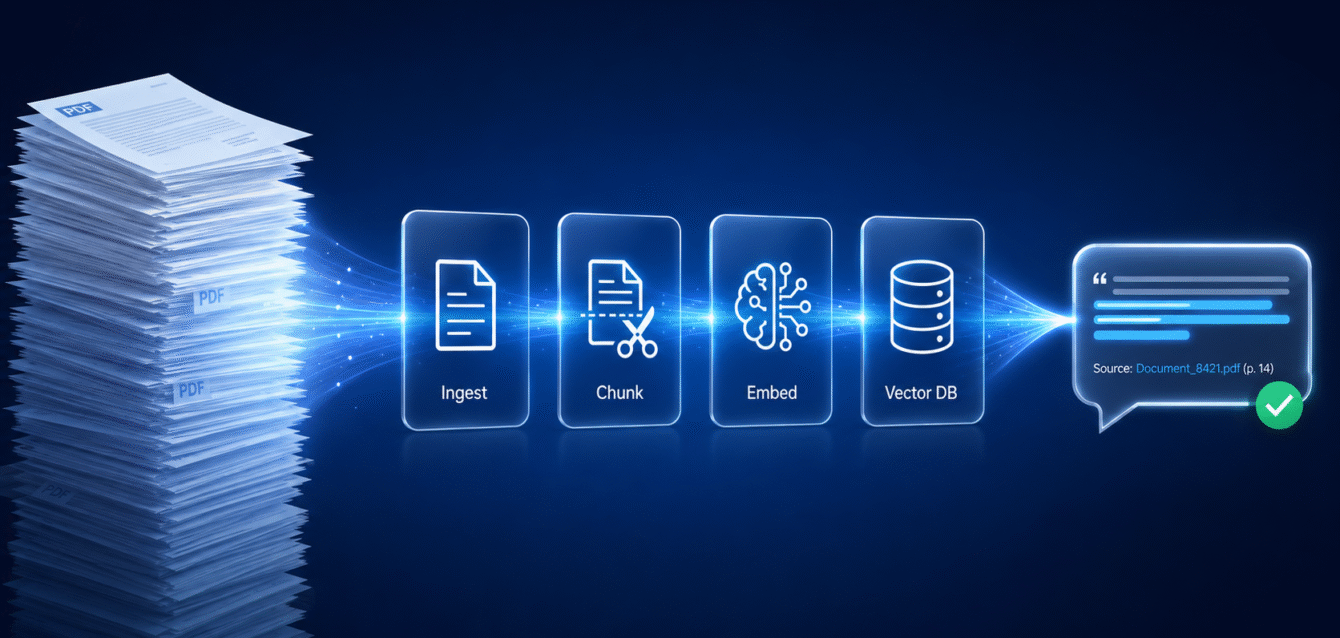
Without getting into the engineering weeds, a custom RAG system has four moving parts. We’ll walk through each one the way we’d explain it to a non-technical founder over coffee. Here’s the whole pipeline at a glance:
Step 1: Ingestion — Turning Messy PDFs into Clean Text
UN resolutions are published as PDFs — often scanned, sometimes with footnotes, headers, and multi-column layouts. Before anything else, we needed clean text. We built an ingestion pipeline that pulls each PDF, runs it through an OCR layer for any scanned pages, strips boilerplate (page numbers, repeated headers), and tags each document with metadata: resolution number, session, date, language, and topic.
This sounds boring. It’s not — it’s the step that quietly determines whether the whole system works. Garbage in, hallucinations out.
Step 2: Chunking — Breaking Documents into Bite-Sized Pieces
You can’t hand a 40-page document to an AI model and ask it to find the relevant sentence. We need to break each document into smaller, self-contained chunks — typically 300 to 800 words each — that the system can match to a question.
For UN resolutions, we chunked at the paragraph level (resolutions are conveniently numbered by paragraph) with a small overlap between chunks so that an idea split across two paragraphs isn’t lost. Each chunk carries the metadata of its parent document, so when we retrieve a chunk later we know exactly where it came from.
Step 3: Embeddings — Teaching the System What Each Chunk “Means”
This is the magic step. For each chunk, we use an embedding model — in this project, OpenAI’s text-embedding-3-large — to convert the text into a list of numbers (a 3,072-dimension vector), a mathematical fingerprint of its meaning. Two paragraphs that talk about the same idea in different words will have fingerprints that are close to each other in mathematical space, even if they share zero keywords.
That’s how the system understands that “climate financing” and “financial support for mitigation” are the same concept. It’s semantic search, not keyword search.
Step 4: Vector Database — Where the Fingerprints Live
We store every chunk’s fingerprint in a vector database — a specialized search index optimized for finding the closest matches across millions of numbers in milliseconds. For this project we used a managed vector store, which keeps the operations cost low and lets the client scale to 100,000+ documents without re-architecting.
When an analyst asks a question, the same embedding model converts the question into a fingerprint, the vector database returns the top 5–10 most relevant chunks, and a large language model — in our build, OpenAI’s GPT-5.5 — writes a clean, cited answer grounded strictly in those retrieved chunks. End-to-end, the user waits about 2 to 4 seconds.
The stack at a glance: text-embedding-3-large for embeddings, a managed vector store for retrieval, and GPT-5.5 for grounded answer generation — all wired through a custom ingestion pipeline and a chat UI hosted in the client’s own environment.
Behind the scenes there’s more — guardrails to refuse questions the documents don’t actually answer, a feedback loop so analysts can flag bad responses, language detection for multilingual resolutions, and an admin panel to ingest new documents — but those four steps are the heart of every custom RAG system we build.
Video Demo: See It in Action
Watch the 2-minute walkthrough below to see the system handle a real research question — typing a natural-language query, getting a grounded answer in seconds, and clicking through to the exact UN resolution and paragraph it cited.
The Business Results: Time, Cost, and Confidence
The point of any custom software project isn’t the architecture — it’s the business outcome. Here’s what changed for the client after launching the custom RAG system:
- Research time per question fell from 30–90 minutes to under 10 seconds. A typical analyst now answers in a morning what used to take a full day.
- Citation confidence went up, not down. Every answer links to the exact resolution and paragraph. The team trusts the output enough to use it directly in briefings.
- New analysts onboard faster. Junior team members no longer need a year of institutional memory to navigate the archive — the system surfaces the right context on demand.
- The archive keeps growing without extra effort. Each new UN session ingests overnight. No retraining, no manual indexing, no consultant call-outs.
- Operating cost is a rounding error. Total monthly running cost — vector database, embedding API, language model calls — comes in under what the team used to spend on a single contractor day.
The pattern we’ve seen across every RAG project we’ve built: the value isn’t that AI replaces the analyst. It’s that AI removes the part of the analyst’s job nobody wanted to do in the first place — and frees them to do the strategic, judgment-heavy work they’re actually paid for.
Could a Custom RAG System Work for Your Business?
The UN resolutions project is one specific use case, but the underlying pattern is universal. If your business has any of the following, a custom RAG system is almost certainly worth a 30-minute conversation:
- A legal or contract library — clauses, precedents, NDAs, vendor agreements that lawyers re-read constantly.
- An internal knowledge base — Confluence pages, SOPs, training materials, onboarding docs that nobody can find when they need them.
- Regulatory or compliance documents — FDA filings, financial regulations, audit trails, ISO certifications.
- Customer support history — tickets, transcripts, resolved cases that a support agent could mine in seconds instead of minutes.
- Technical manuals and product documentation — engineering specs, repair manuals, integration docs across multiple product lines.
- Financial reports and analyst archives — investor decks, earnings transcripts, market research.
The economics get more compelling the more documents you have. Below a few hundred documents, a well-organized folder and a good search bar are probably fine. Above a few thousand, you have a knowledge management problem that humans can’t muscle through. That’s where a custom RAG system pays for itself within the first quarter.
Is Your Archive RAG-Ready? — 8-Point Self-Check
Tick the boxes that apply. Five or more “yes” answers means a custom RAG system will almost certainly pay back its build cost in the first quarter.
- ☐ We have more than 1,000 documents (PDFs, Word, internal pages, transcripts) that staff regularly search.
- ☐ A typical research or lookup question takes a person more than 15 minutes today.
- ☐ The same questions get asked repeatedly by different team members.
- ☐ Existing keyword search misses results when phrasing differs from the source text.
- ☐ Answers must include a verifiable citation (legal, regulatory, research, compliance contexts).
- ☐ The document set grows continuously (new contracts, filings, support tickets, releases).
- ☐ Subject-matter experts spend hours on lookups that a junior could handle with the right tool.
- ☐ Documents must stay inside your environment (private cloud, on-prem, regulated industry).
At Determinds we build these systems end-to-end — from the ingestion pipeline through the chat interface — and we host them on infrastructure you own, so your documents never leave your environment. If you’re curious whether this fits your business, the fastest next step is a conversation. We’ll look at your document set, your use case, and tell you honestly whether RAG is the right tool — or whether something simpler will do the job.
Have a document archive begging to be searchable?
Book a free 30-minute discovery call. We’ll review your use case and tell you exactly what a custom RAG system would cost, how long it would take, and whether it’s the right fit.
Book Your Free Discovery Call →Frequently Asked Questions
What is a custom RAG system in simple terms?
A custom RAG (Retrieval-Augmented Generation) system is an AI tool that lets you ask natural-language questions about your own documents and get cited, grounded answers. It works by first retrieving the most relevant passages from your archive, then using a language model to write an answer based only on what it retrieved — so you get the conversational power of AI without the hallucinations.
How is RAG different from just using ChatGPT?
ChatGPT and similar general-purpose models don’t know your private documents — they only know what was in their training data. A custom RAG system connects an AI model directly to your own files, so every answer is drawn from your contracts, policies, manuals, or research, and every answer comes with a citation pointing back to the source.
How long does it take to build a custom RAG system?
A production-ready custom RAG system typically takes 4 to 10 weeks depending on the document set, the complexity of the source files (clean text vs. scanned PDFs vs. mixed media), and the user interface required. A working prototype that you can demo internally is often achievable in 2 to 3 weeks.
How much does a custom RAG system cost to run?
Running costs depend on usage volume, but for most mid-sized document archives (10,000–100,000 documents) and moderate query volumes, monthly operating costs land between a few hundred and a few thousand dollars — covering vector database hosting, embedding APIs, and language model calls. The cost per question is typically a fraction of a cent.
Will my documents be safe if I use a custom RAG system?
Yes — when designed properly. We build custom RAG systems on infrastructure you own, with your documents encrypted at rest and never used to train external AI models. For clients in regulated industries we deploy the entire stack inside their own cloud account, so no document or query ever leaves their environment.
Can a RAG system handle documents in multiple languages?
Yes. Modern multilingual embedding models — including OpenAI’s text-embedding-3-large (the model we used for this project) — cover roughly 100 languages and can match a question in one language to relevant passages in another. The UN resolutions project, for example, includes documents in English, French, and Arabic, and analysts can ask questions in any of those languages and receive answers grounded in the appropriate source text.
Conclusion: From Document Pile to Conversational Knowledge Base
The most underrated business asset most companies have right now is the archive of documents they’ve accumulated over years of operating — and the most common reason that asset sits unused is that nobody has time to read it. A custom RAG system turns that archive into a conversation. Ask a question. Get a cited answer. Move on with your day.
Our UN resolutions client went from “I need an afternoon” to “I need ten seconds” — and the same shift is available to any business willing to invest a few weeks in the right architecture. If that’s a conversation worth having for your team, we’d love to have it.
References
- Lewis et al., “Retrieval-Augmented Generation for Knowledge-Intensive NLP Tasks”, Meta AI / arXiv, 2020 — the foundational RAG paper.
- United Nations, General Assembly Resolution A/RES/76/300 — example source document.
- AWS SageMaker pricing and Lambda Labs GPU cloud pricing — basis for fine-tuning cost estimates.
- OpenAI API pricing and Anthropic API pricing — basis for per-query cost estimates.
- OpenAI Embeddings documentation — reference for the
text-embedding-3-largemodel used in this project.
Related Resources from Determinds